How to Convert Chase Bank Statement to Excel
Convert Chase statement PDFs into clean Excel and QuickBooks CSV with consistent debit and credit columns.
Chase exports often include dense memo fields. CleanStmt keeps row alignment stable with zero merged cells.
The Best Tool for Chase Statements
Upload your Chase statement and export a clean file in seconds. No spreadsheet cleanup required.
Optimized for national banks with no merged cells and consistent transaction columns.
Drop Image / PDF
Or Ctrl+V paste
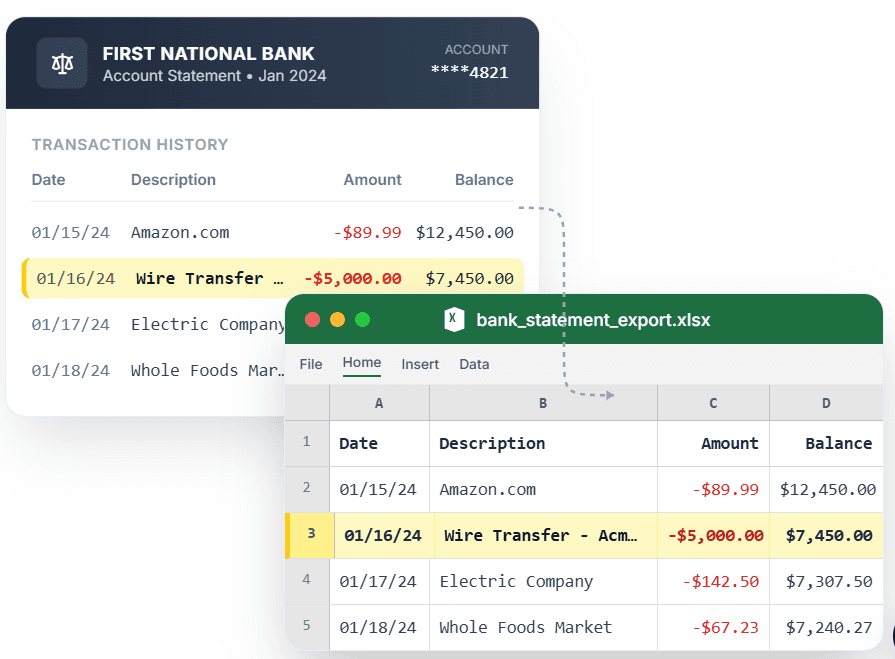
PDF → Clean Excel with separated columns, no merged cells.
How to export your Chase statement to Excel in 3 steps
- Step 1: Upload your Chase PDF statement or paste a screenshot.
- Step 2: Review extracted rows and confirm the output columns.
- Step 3: Export clean Excel or QuickBooks-ready CSV with no merged cells.
Common Chase statement cleanup issues
- Long memo descriptions can push amounts out of alignment in generic PDF converters.
- Multi-page statement exports may break running balances into inconsistent rows.
What makes Chase statement conversion different
Chase statements are frequently used in high-volume bookkeeping and reconciliation workflows. CleanStmt is tuned for fast extraction with consistent row alignment so accountants can avoid merged cells and reduce post-export edits.
Compare with similar statement converters
Browsing alternatives in the same category helps teams choose the right conversion workflow for each statement source.
Frequently asked questions for Chase conversions
Can I convert Chase statements with no merged cells?
Yes. CleanStmt removes merged-cell formatting and exports transactions in clean row-by-row structure for analysis and bookkeeping.
Is this Chase statement converter QuickBooks ready?
Yes. You can export CSV output with consistent date and amount columns designed for QuickBooks import workflows.
Can I use screenshot or scanned Chase statements?
Yes. CleanStmt supports statement PDFs, scans, and screenshots so teams can standardize data from different source formats.
How fast can I export Chase transactions to Excel?
Most files are processed in seconds. Upload, review, and export clean Excel or CSV output without manual cleanup.
How does CleanStmt handle Chase layout edge cases?
It is built to address issues like: Long memo descriptions can push amounts out of alignment in generic PDF converters. so you keep reliable row and column structure.
Can I use Chase statement output for bank reconciliation?
Yes. CleanStmt keeps transaction rows structured so accounting teams can quickly match entries during month-end reconciliation.
Can CleanStmt reduce manual fixes caused by Chase formatting issues?
Yes. It specifically helps with problems like: Multi-page statement exports may break running balances into inconsistent rows. while keeping exports QuickBooks-ready.